
AI & Automation
Turn repetitive operations into controlled, measurable systems.
AI is useful when it connects to your CRM, ticketing, email, documents and databases, with clear controls and human review where it matters. We build those integrations and operate them like any other production system.
Problems we solve
Sound familiar?
Teams retype the same data between three systems.
Knowledge sits in documents nobody can find.
AI pilots never made it past the demo.
Capabilities
What AI & Automation covers.
- AI consulting and strategy
- AI advisory and adoption planning
- AI application development
- AI agents with defined permissions
- Workflow automation
- API integration
- Internal assistants
- Knowledge systems
- Document automation
- Help desk automation
- Business process automation
- AI integration with SaaS, CRM and ERP
How it works
A defined path from first look to steady state.
Identify
Find the high-volume, rule-heavy work where automation pays back clearly.
Design
Define data access, controls, human review points and the success metric.
Build
Integrate with existing systems through supported APIs, then test against real cases.
Operate
Monitor accuracy, cost and failures. Improve or retire what doesn't perform.
Architecture
Human-led AI automation, end to end.
The human operates; AI agents automate the repetitive steps. Every action passes through rules, approvals and audit in the Landtech Control Center.
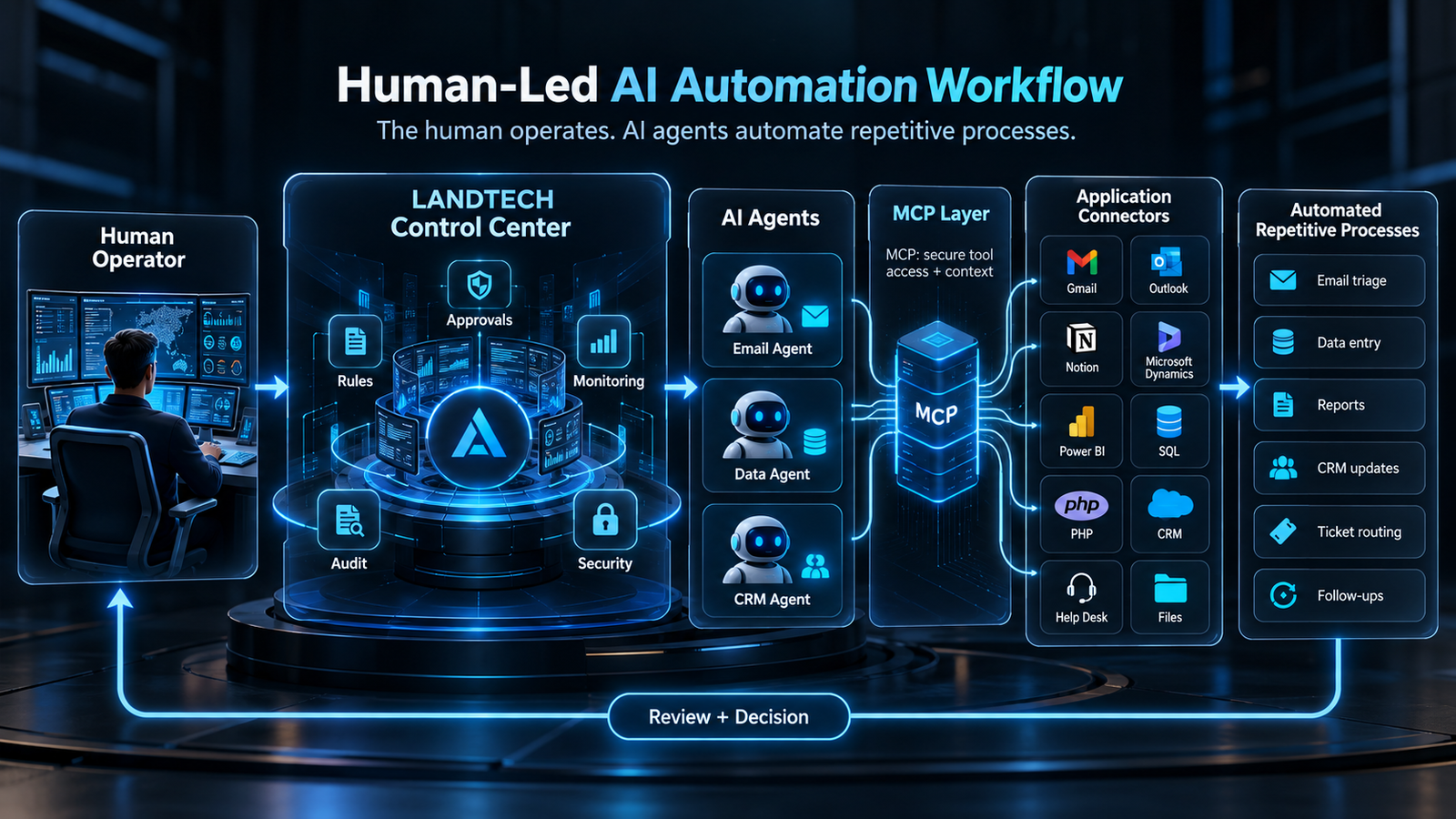 (opens full-size diagram in a new tab)
Architecture & technology
Platforms we work with.
- Microsoft Power Automate
- APIs and webhooks
- LLM platforms
- CRM / ERP
- Ticketing systems
- Databases
Security considerations
Least-privilege access to data, logged actions, no sensitive data sent to services without review, and human approval on consequential steps.
Engagement model
Engage it the way that fits.
Complete Managed IT
We run day-to-day technology operations end to end: support, infrastructure, security and strategy.
Co-Managed IT
Your internal team keeps ownership. We add engineering depth, security, help desk capacity and tooling.
Project & Specialized Engineering
Defined initiatives: migrations, network redesign, security programs, cloud architecture, AI automation.
FAQ
Common questions.
Do we need a big data project first?
Rarely. Most useful automation starts with one workflow and the systems it already touches.
Will AI act on its own?
Only where you decide it should. We design review points into any workflow with real consequences.
Will the technical documentation help us find and fix a failure in our AI system?
It's where diagnosis starts. Each automation is documented with its data sources, integrations, rules, permissions, review points and logs, so when something fails you can see which step broke and what it depends on. The documentation won't repair the fault by itself, but it shortens the time to locate it, for our team or yours.
How can we improve our productivity chain with AI?
Start by mapping one repetitive process step by step, then automate the parts with clear rules and high volume: ticket triage, summaries before escalation, report and documentation drafts, email classification and CRM updates. Connect AI directly to the systems where the work happens instead of copying text between tools, keep a human approval wherever an action has consequences, and measure time and errors before and after. Expand only what proves its value.
Related services
Works alongside.
Managed IT
Day-to-day IT run with documentation, standards and a named team that knows your environment.
Explore Managed ITNetworking
Networks designed, segmented and monitored, from one office to many sites.
Explore NetworkingCybersecurity
Reduce exposure across users, endpoints, networks, cloud and data.
Explore Cybersecurity
Get in touch
Let's understand your environment.
Tell us what you're running today, where technology is creating friction, and what needs to improve. We'll help you find the right operating model.
